




01-18-2015, 07:18 PM
Merhaba, bugün forumexenin yeni postbitinin yapımını anlatacağım, bildiğiniz gibi postbit şık, hoş ve sade bir tasarımdır..
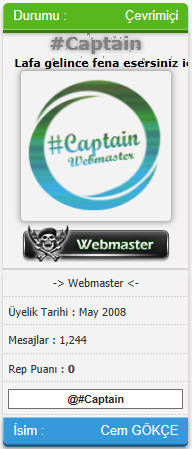
Admin KP - Şablon & Stil - Kullandığınız Tema - Global.css giriyoruz aşağıdaki kodları en altına ekliyoruz..
Kod:
.postingo{
 border-bottom:1px dashed #D4D4D4;
 color:#333;
 font-family:Tahoma,Geneva,sans-serif;
 font-size:11px;
 padding:5px 5px 5px 5px;
 margin-top:2px
}

.postbitlegacy .userinfo .rank{
 text-align:center
}

.postbitlegacy .userinfo .imlinks{
 background:#ECECEC;
 border:1px;
 border-color:#D4D4D4;
 border-style:solid;
 border-left:1px;
 border-left-color:#D4D4D4;
 border-left-style:solid;
 border-bottom:1px;
 border-bottom-style:solid;
 border-bottom-color:#D4D4D4;
 color:#333;
 font-family:Tahoma,Geneva,sans-serif;
 font-size:11px;
 width:70%;
 margin-top:2px;
 text-align:center
}

.postbitlegacy .userinfo .postuseravatar,.postbitlegacy .userinfo .postuseravatar img{
 float:none;
 text-align:center
}

.postcontainer .username_container .popupmenu a.popupctrl{
 font-size:15px
}

.postbit_alani_durumu_cevrimdisi{
        background:#f15a5a;
        text-align:left;
        border-top-left-radius:5px;
        border-top-right-radius:5px;
        padding:0 10px;
        color:#fff;
        position:relative;
        text-decoration:none;
        height:23px;
        font-family:Arial;
        box-shadow:0px 3px #922b2b, 0px 4px 5px rgba(0,0,0,0.3);
        transition:all 0.3s ease;
        padding-left:10px;
        padding-right:10px;
        padding-top:4px;
}

.postbit_alani_durumu_cevrimdisi dd {
           float: right;
}

.postbit_alani_durumu_iceride{
        background:#57b71d;
        text-align:left;
        border-top-left-radius:5px;
        border-top-right-radius:5px;
        padding:0 10px;
        color:#fff;
        position:relative;
        text-decoration:none;
        height:23px;
        font-family:Arial;
        box-shadow:0px 3px #3a7e11, 0px 4px 5px rgba(0,0,0,0.3);
        transition:all 0.3s ease;
        padding-left:10px;
        padding-right:10px;
        padding-top:4px;
}

.postbit_alani_durumu_iceride dd {
 float:right
}

.my_username{
 background:none repeat scroll 0 0 #E9E9E9;
 border-color:#D0DAE0 #C5C7C6 #C5C7C6;
 border-style:solid;
 border-top-left-radius:8px;
 border-top-right-radius:8px;
 border-width:1px 0;
 font-size:18px;
 width:100%
}

.my_username_ic{
 background:none repeat scroll 0 0 #E9E9E9;
 border-color:#C5C7C6 #C5C7C6 #FFFFFF;
 border-style:solid;
 border-width:0 0 1px;
 height:65px
}

.my_username2{
 margin-left:200px
}

.my_postbit{
 padding-left:4px;
 padding-right:2px;
 padding-top:3px;
 padding-bottom:3px;
 background-color:#efefef;
 border-top:1px solid #ddd;
 border-right:1px solid #ddd;
 border-left:1px solid #c4c4c4;
 border-bottom:1px solid #c4c4c4;
 margin-bottom:4px;
 -moz-box-shadow:2px 2px 6px #b3b3b3;
 -webkit-box-shadow:1px 2px 2px #b3b3b3;
 -moz-border-radius-bottomleft:6px;
 -moz-border-radius-topright:6px;
 -webkit-border-top-right-radius:0px;
 -webkit-border-bottom-left-radius:0px
}

.postbitlegacy .userinfo .username_container,.postbitlegacy .userinfo .usertitle .imlinks{
 text-align:center
}

.postbitlegacy .userinfo .postuseravatar,.postbitlegacy .userinfo .postuseravatar img{
 float:none;
 text-align:center
}

.postbitlegacy .userinfo .usertitle{
 display:block;
 float:none;
 text-align:center;
 clear:both
}

.postbitlegacy .userinfo .userinfo_extra{
 text-align:center
        width:70%;
}

.postbit_reputation{
 float:none;
 text-align:center
}

.postbitlegacy .imlinks{
 float:none;
 text-align:center
}

.postbitlegacy .userinfo .userinfo_extra dd{
 text-align:right
}

.postcontainer .username_container .popupmenu a.popupctrl{
 font-size:19px
}

.isimpostbit{
 margin-top:2px;
        box-shadow:0px 3px #1e618e, 0px 4px 5px rgba(0,0,0,0.3);
 border-bottom-left-radius:5px;
 border-bottom-right-radius:5px;
        background:#3498db;
        text-align:left;
        padding:0 10px;
        color:#fff;
        position:relative;
        text-decoration:none;
        height:23px;
        font-family:Arial;
        transition:all 0.3s ease;
        padding-left:10px;
        padding-right:10px;
        padding-top:4px;
}

.avatarsb {
      opacity: 0.75;
      border: 1px solid #a6a6a6;
      border-radius: 4px;
      -o-border-radius: 4px;
      -ms-border-radius: 4px;
      -moz-border-radius: 4px;
      -webkit-border-radius: 4px;
      -webkit-box-shadow: 0 0 10px 0 rgba(0,0,0,0.5);
      box-shadow: 0 0 10px 0 rgba(0,0,0,0.5);
      -webkit-transition: all 0.5s ease;
      -moz-transition: all 0.5s ease;
      -ms-transition: all 0.5s ease;
      -o-transition: all 0.5s ease;
      transition: all 0.5s ease;
}

.avatarsb:hover {
      opacity: 1;
      -webkit-transition: all 0.5s ease;
      -moz-transition: all 0.5s ease;
      -ms-transition: all 0.5s ease;
      -o-transition: all 0.5s ease;
      transition: all 0.5s ease;
}

.postarka {
background: #f3f3f3;
box-shadow: 2px 2px 2px 0px #e2dddd, 0px 4px 5px rgba(0,0,0,0.3);
transition: all 0.3s ease;
width: 100%
}
Admin KP - Şablon & Stil - Şablonlar - Kullandığınız Tema - Postbit Şablonları - Postbit'e giriyoruz içindeki tüm kodu silip aşağıdaki kodu ekliyoruz..
Kod:
{$ignore_bit}
 <table border="0" cellspacing="{$theme['borderwidth']}" cellpadding="{$theme['tablespace']}" class="tborder" style="{$post_extra_style} {$post_visibility}" id="post_{$post['pid']}">
     <tr>
         <td class="{$altbg}" width="15%" valign="top" style="white-space: nowrap; text-align: normal;"><a name="pid{$post['pid']}" id="pid{$post['pid']}"></a>
 {$post['onlinestatus']}
 <strong><span class="largetext"><div class=postarka><center><font size="4px">{$post['profilelink']}</font></center></span></strong>
         <span class="smalltext">
             <center><marquee><span style="color: #000; background: url(http://www.resimagaci.com/img/659vj90.gif);"><b>{$post['fid4']}</b></span></marquee></div>
             <center><div class=postarka>{$post['useravatar']}<br />{$post['groupimage']}</div></center>
 {$post['user_details']}<br/>{$post['awards']}<br/>{$post['awards']}
         </span>

     </td>

     <td class="{$altbg}" valign="top">
         <table width="100%">
             <tr><td>{$post['posturl']}<span class="smalltext"><strong>{$post['icon']}{$post['subject']} {$post['subject_extra']}</strong></span>
             <br />
             <div id="pid_{$post['pid']}" class="post_body">
                 {$post['message']}
             </div>
             {$post['attachments']}
             {$post['signature']}
             <div style="text-align: right; vertical-align: bottom;" id="post_meta_{$post['pid']}">
                 <div id="edited_by_{$post['pid']}">{$post['editedmsg']}</div>
                 {$post['iplogged']}
             </div>
         </td></tr>
     </table>
 </td>
 </tr>
 <tr>
     <td class="{$altbg}" style="white-space: nowrap; text-align: center; vertical-align: middle;"><span class="smalltext">{$post['postdate']} {$post['posttime']}</span></td>
     <td class="{$altbg}" style="vertical-align: middle;">
         <table width="100%" border="0" cellpadding="0" cellspacing="0">
             <tr valign="bottom">
                 <td align="left" ><span class="smalltext">{$post['button_email']}{$post['button_pm']}{$post['button_www']}{$post['button_find']}{$post['button_rep']}</span></td>
                 <td align="right">{$post['button_edit']}{$post['button_quickdelete']}{$post['button_quote']}{$post['thanks']}{$post['button_multiquote']}{$post['button_report']}{$post['button_warn']}{$post['button_reply_pm']}{$post['button_replyall_pm']}{$post['button_forward_pm']}{$post['button_delete_pm']}</td>
             </tr>
         </table>
     </td>
 </tr>
 </table>
Admin KP - Şablon & Stil - Şablonlar - Kullandığınız Tema - Postbit Şablonları - Postbit_classic'e giriyoruz içindeki tüm kodu silip aşağıdaki kodu ekliyoruz..
Kod:
{$ignore_bit}
 <table border="0" cellspacing="{$theme['borderwidth']}" cellpadding="{$theme['tablespace']}" class="tborder" style="{$post_extra_style} {$post_visibility}" id="post_{$post['pid']}">
     <tr>
         <td class="{$altbg}" width="15%" valign="top" style="white-space: nowrap; text-align: normal;"><a name="pid{$post['pid']}" id="pid{$post['pid']}"></a>
 {$post['onlinestatus']}
 <strong><div class=postarka><span class="largetext"><center><font size="4px">{$post['profilelink']}</font></center></span></strong>
         <span class="smalltext">
             <center><marquee><span style="color: #000; background: url(http://www.resimagaci.com/img/659vj90.gif);"><b>{$post['fid4']}</b></span></marquee></div>
             <center><div class=postarka>{$post['useravatar']}<br />{$post['groupimage']}</div></center>
 {$post['user_details']}<br/>{$post['awards']}<br/>{$post['awards']}
         </span>

     </td>

     <td class="{$altbg}" valign="top">
         <table width="100%">
             <tr><td>{$post['posturl']}<span class="smalltext"><strong>{$post['icon']}{$post['subject']} {$post['subject_extra']}</strong></span>
             <br />
             <div id="pid_{$post['pid']}" class="post_body">
                 {$post['message']}
             </div>
             {$post['attachments']}
             {$post['signature']}
             <div style="text-align: right; vertical-align: bottom;" id="post_meta_{$post['pid']}">
                 <div id="edited_by_{$post['pid']}">{$post['editedmsg']}</div>
                 {$post['iplogged']}
             </div>
         </td></tr>
     </table>
 </td>
 </tr>
 <tr>
     <td class="{$altbg}" style="white-space: nowrap; text-align: center; vertical-align: middle;"><span class="smalltext">{$post['postdate']} {$post['posttime']}</span></td>
     <td class="{$altbg}" style="vertical-align: middle;">
         <table width="100%" border="0" cellpadding="0" cellspacing="0">
             <tr valign="bottom">
                 <td align="left" ><span class="smalltext">{$post['button_email']}{$post['button_pm']}{$post['button_www']}{$post['button_find']}{$post['button_rep']}</span></td>
                 <td align="right">{$post['button_edit']}{$post['button_quickdelete']}{$post['button_quote']}{$post['thanks']}{$post['button_multiquote']}{$post['button_report']}{$post['button_warn']}{$post['button_reply_pm']}{$post['button_replyall_pm']}{$post['button_forward_pm']}{$post['button_delete_pm']}</td>
             </tr>
         </table>
     </td>
 </tr>
 </table>
Admin KP - Şablon & Stil - Şablonlar - Kullandığınız Tema - Postbit Şablonları - Postbit_author_usher'e giriyoruz içindeki tüm kodu silip aşağıdaki kodu ekliyoruz..
Kod:
<div class=postarka>
<div class=postingo><center> $post[fid3] </center></div>
<div class=postingo>Üyelik Tarihi : {$post['userregdate']}</div>
<div class=postingo>Mesajlar : {$post['postnum']}</div>
<div class=postingo>Rep Puanı : {$post['userreputation']}</div>
<div class=postingo><center><input tabindex="1" title="@$post[username]'in kullanıcı adını kopyala.." style="padding: 3px; width: 167px; text-align: center; font-weight: bold;" onclick="select()" type="text" size="27" maxlength="80" value="@$post[username]"></center></div>
<div class="isimpostbit"><dt>İsim : <div style="float: right;"> $post[fid1] </div></dt></div></div>
Admin KP - Şablon & Stil - Şablonlar - Kullandığınız Tema - Postbit Şablonları - Postbit_avatar'a giriyoruz içindeki tüm kodu silip aşağıdaki kodu ekliyoruz..
Kod:
<a href="{$post['profilelink_plain']}"><img class="avatarsb" src="{$post['avatar']}" width="150" height="150" /></a>Admin KP - Şablon & Stil - Şablonlar - Kullandığınız Tema - Postbit Şablonları - Postbit_away'a giriyoruz içindeki tüm kodu silip aşağıdaki kodu ekliyoruz..
Kod:
<div class="postbit_alani_durumu_iceride">Durumu : <dd> Çevrimiçi </dd></div>Admin KP - Şablon & Stil - Şablonlar - Kullandığınız Tema - Postbit Şablonları - Postbit_online'e giriyoruz içindeki tüm kodu silip aşağıdaki kodu ekliyoruz..
Kod:
<div class="postbit_alani_durumu_iceride">Durumu : <dd> Çevrimiçi </dd></div>Admin KP - Şablon & Stil - Şablonlar - Kullandığınız Tema - Postbit Şablonları - Postbit_offline'e giriyoruz içindeki tüm kodu silip aşağıdaki kodu ekliyoruz..
Kod:
<div class="postbit_alani_durumu_cevrimdisi">Durumu : <dd> Çevrimdışı </dd></div>Admin KP - Şablon & Stil - Şablonlar - Kullandığınız Tema - Postbit Şablonları - Postbit_warninglevel ve postbit_reputation'e giriyoruz <br> kodunu siliyoruz..
--------------------------- Anahtar Kelimeler ------------------------------
Forumexenin yeni temasını indir - Forumexenin yeni postbiti nasıl yapılıyor - Forumexenin yeni postbitini yap - Forumexenin yeni postbitinin css html kodu - Forumexe yeni temasını full indir - Forumexenin yeni mybb uyarlamalı temasını indir - Forumexenin yeni postbiti nasıl yapılır - Forumexenin yeni temasını türkçe indir - ForumExe New Postbit - #Captain Full Indir ForumExe New Postbit - #Captain Serial ForumExe New Postbit - #Captain Full Dinle ForumExe New Postbit - #Captain Full Izle ForumExe New Postbit - #Captain Download ForumExe New Postbit - #Captain Yükle ForumExe New Postbit - #Captain Free Download ForumExe New Postbit - #Captain ne demek ForumExe New Postbit - #Captain nasil oluyor ForumExe New Postbit - #Captain crack ForumExe New Postbit - #Captain tek link ForumExe New Postbit - #Captain yapma ForumExe New Postbit - #Captain ücretsiz indir ForumExe New Postbit - #Captain fragmani ForumExe New Postbit - #Captain Film ForumExe New Postbit - #Captain Müzik ForumExe New Postbit - #Captain mp3 ForumExe New Postbit - #Captain Videolari ForumExe New Postbit - #Captain Resimleri ForumExe New Postbit - #Captain Dizileri ForumExe New Postbit - #Captain Sorun ForumExe New Postbit - #Captain hatasi ForumExe New Postbit - #Captain Cözüm nedir ForumExe New Postbit - #Captain ne demek ForumExe New Postbit - #Captain nasil ForumExe New Postbit - #Captain Program ForumExe New Postbit - #Captain anlatım ForumExe New Postbit - #Captain torrent ForumExe New Postbit - #Captain bedava ForumExe New Postbit - #Captain kasma ForumExe New Postbit - #Captain kodu ForumExe New Postbit - #Captain Kurulum ForumExe New Postbit - #Captain Yardim
ForumExe New Postbit - #Captain Kim
------------------------------------------------------------------------------
Bkz: ForumExe New Postbit - #Captain
![[-]](http://expertboss.10tl.net/images/collapse.png "[-]")
 Anahtar Kelimeler:
  Konu İsmi: ForumExe New Postbit - #Captain
  Yazar: Point1234